
VMware Virtualization for Small & Medium Businesses
VMware Virtualization Solutions, Increase IT Efficiency and Virtual Management
Use the applications you already know and get business continuity protection from the industry’s leading virtualization platform. End users can securely access their email or desktop from any device, while VMware's policy-based automation keeps IT management simple.
Protect Your Business
 Business continuity is a top priority for SMBs, but traditional solutions are complex and expensive. Meanwhile, security is a growing challenge with new devices always entering the IT environment.
VMware protects your business with built-in high availability for all your applications. Automatically restart applications when server failures occur, or ensure no disruption at all with fault-tolerant protection. Multi-site failover is also available. All this is possible on the applications you already use.
To secure your IT environment, VMware allows you to manage security in a single framework that is virtualization-aware and enables the secure delivery of data, apps, and desktop environments to end users on any device.
Simplify Your IT
 Stay focused on running your business with IT that just works.
VMware simplifies your IT with intuitive management so the technology stays out of the way. Centrally manage your end-user mailboxes and infrastructure (virtual and physical) via your web browser. Ensure your most important apps perform at their best with just a few mouse clicks. And let your end users access the apps they already know, from the devices they love.
Lastly, get the flexibility to run your existing apps on premise or in the cloud by trusted vCloud Datacenter service providers.
Watch the VMware TV Series: Introduction to Virtualization
Save Money
SMBs have limited resources, and always need to make do on tight budgets.
VMware lowers your infrastructure costs with the industry’s leading virtualization platform to get the most out of your hardware. To help save on application costs, VMware provides cost-effective and feature-rich email collaboration solutions. You can integrate VMware with existing collaboration investments and end users can continue to use the email clients they love.
You’ll also have the option to test and develop new applications on vCloud Express-powered services—pay only for what you use with credit card billing.
Virtualization and Management Solutions from VMware
Business Continuity
VMware simplifies business continuity by delivering a flexible IT environment and automating backup, failure detection, and recovery, for your server and desktop workloads.
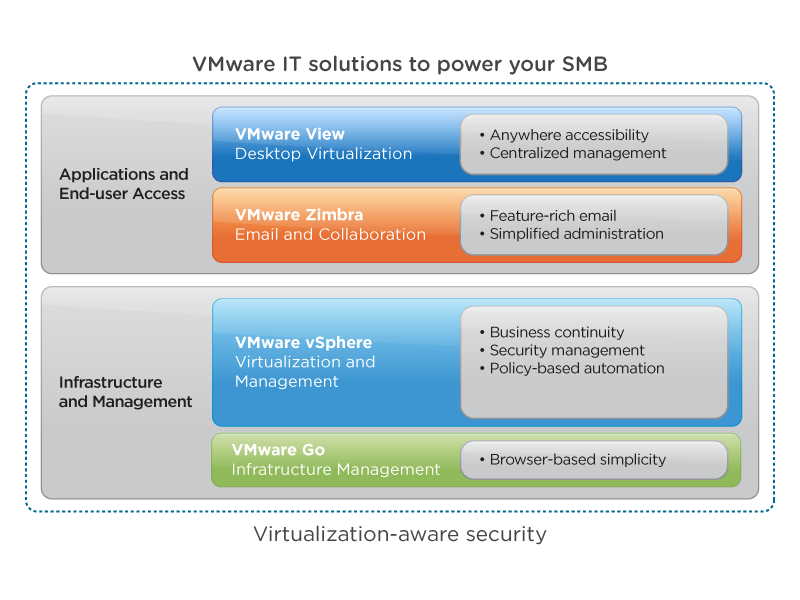
Business continuity begins with the industry's most robust virtualization platform: VMware vSphere. Give all your applications high availability protection, so apps automatically come back in just a few minutes when server failures occur. Run your most important applications with fault tolerance protection to get continuous availability even through sever failures. If your business has multiple sites, VMware enables you to automate disaster recovery planning and execution with Site Recovery Manager.
Security
VMware delivers "better-than-physical security" with virtualization-aware security that stays with your virtual machines no matter where they are running. Manage your security in a single comprehensive framework at all levels – host, network, application, data, and endpoints, all in a single pane of glass. VMware security solutions can also work seamlessly with your existing security solutions. There's a reason why all of the Fortune 100 and military and government installation trust VMware.
Server Consolidation
Deploying new applications while dealing with platform dependencies can lead to server sprawl and quickly drive up costs. VMware gives you control and flexibility with the highest consolidation ratios in the industry. This means you can better utilize your hardware and run more applications while ensuring performance levels. The result is less servers to manage, and increased flexibility to provision new apps without buying a new server every time.
Automation and Performance
Running IT environments can be tedious with numerous manual tasks to set up new applications and constant monitoring of your apps to make sure they're performing. VMware addresses both these challenges. Accelerate provisioning time by up to 70% with reusable images all done from a single pane of glass. And ensure service levels for your most critical applications with policy-based compute, network, and storage resource prioritization.
IT Management as a Service
Delivered as a service, VMware Go Pro is an IT Administrator's Intelligent Control Center in the Cloud that simplifies and automates routine tasks. VMware Go Pro makes it easy for you to create, manage, monitor and secure your IT infrastructure by providing a single pane of glass for managing physical and virtual assets.
Simplified IT Management
Reduce your time-to-value from months to minutes with VMware vCenter™ Protect Essentials Plus. You can manage both physical and virtual machines, deploy software, discover assets, simplify configuration, control power usage remotely and ensure endpoint security.
Infrastructure as a Service
Whether you're looking for a service providers to run your apps with production service levels, or just need some additional capacity for development and testing, VMware gives you options. VMware's certified vCloud Datacenter partners deliver enterprise-class infrastructure services. To quickly get computing capacity for with development, vCloud Express partners provide on-demand, pay-as-you-go cloud Infrastructure-as-a-Service (IaaS).
Email and Collaboration
Many existing email solutions cannot support multiple user platforms – they are desktop centric, and have limited capabilities while offline, and don't easily integrate with other applications.
VMware addresses these challenges with an enterprise-class, open source email, calendar, and collaboration platform: VMware Zimbra. You can simplify administration while end users maximize productivity with a feature rich experience with anywhere access. Your business can benefit from integration or mash-ups with other applications to streamline workflows.
Desktop Virtualization
From hosted virtual desktops solutions to running multiple environments on PC or Macs, VMware is the gold standard for end-user computing virtualization. With VMware, you have the option to modernize your desktops into untethered workspaces available from anywhere, at any time, or simply run multiple operating systems on your PC or Mac.
VMware's centralized desktop virtualization solution, VMware View, benefits from vSphere's business continuity and security features. View delivers rich virtual desktops to end users with a single view of all their applications and data in a familiar, personalized environment. End users get flexibility, while you minimize costs for desktop and application management.
You also have the option run multiple computing environments directly on your desktop. VMware Workstation Pro for PCs enables you to quickly switch between different computing environments, set multi-tier configurations and networks, create multiple virtual machine snapshots, and more. Built from the ground up for the Mac, VMware Fusion lets users run all Windows applications and devices on any Intel-based Mac.
Getting Started:
Simplifying your IT environment with VMware is fast and easy to do. The first step is to virtualize your environment with vSphere. Then use the vCenter Server management console to enable vSphere's built-in business continuity features, and configure or add more capabilities as needed.
Also, you can use VMware consulting services to make sure you're using best practices and getting the most out of your VMware deployment, or become a VMware Certified Professional with education services.
 Virtualizing Your Environment with vSphere
- Install the hypervisor (ESXi). Do this directly on your servers or use our free web-based VMware Go wizard to guide you through the installation.
- Convert your existing physical servers into virtualized server hosts (a P2V conversion). VMware Converter does this for you. Simply provide a privileged username/password and configuration information (including source and destination data).
- Enable centralized management by setting up vCenter Server, and use the vSphere Client to identify the server hosts you'd like to manage in your virtualized environment.
Now you can manage and configure your virtual machines and server hosts, monitor CPU usage with the CPU reporting tool, create virtual machines at a click of a button, and much more.
Implementing Built-in Business Continuity
Once you've virtualized your environment with vSphere you're mouse clicks away from enabling BCDR. For example:
- Implement business continuity and disaster recovery by turning on High Availability and automatic protection of your virtual machines. vCenter will automatically restart your virtual machines on working servers using the latest backup if a server hosts ever fails.
- Perform zero-downtime maintenance by automatically moving live virtual machines away from server hosts that need to be serviced—without any interruption to the application or end user.
- Ensure security and compliance with Update Manager, deploy and monitor all patches from a single pane of glass.
Using Advanced Capabilities
VMware pioneered x86 virtualization and continues to develop features only available from VMware. Whether it's policy-based automation of infrastructure resources, security and compliance, or advanced management features, all are integrated with vCenter Server.
Get Started with the Most Proven and Reliable Hypervisor
Only VMware virtualization is built on a truly-thin hypervisor that has no dependency on the underlying operating system. The small footprint reduces the attack surface for external threats and therefore requires fewer patches. Why does this matter? A larger footprint makes you more vulnerable to attack from external threats, and as the foundation of all your applications, resiliency to this component is critical. If a device driver fails, all virtual machines on that physical machine will fail. VMware protects your virtual machines with device drivers oprtimized for virtual machines, built-in I/O control at the hypervisor level and advanced memory management techniques that make memory usage more efficient.
Use the Most Trusted Virtualization Solution for SMBs
VMware is the most trusted virtualization vendor across all industries and company sizes. Used by more than 190,000 customers worldwide, including 80% of small businesses, independent analysts from Gartner have named VMware as the lone leader in the Magic Quadrant.
Get a Higher ROI with VMware
VMware's total cost of ownership is actually cheaper than the "free" solutions from other vendors. First, our higher virtual machine density means you'll fit more applications on each server so you'll need fewer servers. Fewer servers mean lower operational and capital expenses because you buy less hardware, use less power and need less space. And you can maintain those fewer machines with a smaller staff. On top of all that, our expanded feature set and integrated management tools lowers the total cost of ownership even more. Learn more about the total true cost of ownership.
VMware is Easy to Use
Every company needs high availability and disaster recovery capabilities, no matter how large or small. What you don't need is a solution that overwhelms your staff with its complexity. VMware has reduced the operational complexity of virtualization so you can more easily deploy and manage a virtualized infrastructure. VMware virtualization delivers business continuity without complexity and gives you:
- Easily configurable high availability with VMware High Availability and automated and standardized disaster recovery with VMware Data Recovery
- Dynamic patching and updating so users aren't interrupted by your maintenance and you don't waste time tracking, managing and manually applying patches with VMware Update Manager
- Instant provisioning so new staff and consultants can be up and running quickly with vCenter Server
- Zero downtime maintenance with live migration of virtual machines with vMotion
| SMB Feature Comparison Table | |||
|---|---|---|---|
| Hypervisor Attributes | VMware vSphere 5 | Windows Server 2008 R2 SP1 with Hyper-V | Citrix XenServer 6 |
| Configuration Maximums | 160 logical cores per host 2TB physical RAM per host 8 vCPUs per VM 1TB RAM per VM |
64 logical cores per host 1TB physical RAM per host 4 vCPUs per VM 64GB RAM per VM |
64 logical cores per host 1TB physical RAM per host 32 vCPUs per VM 128GB RAM per VM |
| Small Disk Footprint | 144 MB disk footprint | >3GB disk footprint | >1GB disk footprint |
| OS Independence | No reliance on general purpose operating system | Relies on Windows 2008 in Parent Partition | Relies on Linux in Dom 0 management partition |
| Hardened Drivers | Optimized with hardware vendors | Generic Windows drivers | Generic Linux Drivers |
| Advanced Memory Management |
Ability to reclaim unused memory, de-duplicate memory pages, compress memory pages | Recently added memory ballooning; no deduplication or compression of pages | Recently added basic overcommit; no deduplication or compression of pages |
| Advanced Storage Management |
True cluster file system (VMFS) | Lacks an integrated cluster file system | Lacks an integrated cluster file system, storage features support very few arrays |
| High I/O Scalability | Direct driver model | I/O bottleneck in parent OS | I/O bottleneck in Dom0 management OS |
| Broad Guest OS Support | Over 80 OSs supported | 25 OSs supported | 29 OSs supported |