
VMware vCenter Configuration Manager
Policy-Driven Configuration Management and Compliance Control
Overview:
VMware vCenter Configuration Manager™ (VCM)—a key part of the VMware vCenter™ Operations Manager™ suite—delivers capabilities fundamental to ensuring that virtualized and cloud computing environments are properly configured to meet operational, security and compliance requirements. VCM is a full-featured configuration-management solution that automates configuration management across virtual, physical and cloud environments. Enterprises can use VCM to continuously audit the configurations of VMware infrastructure (including VMware ESX, ESXi™, vCenter, vCloud Director™ and vShield™) as well as Windows, Linux and UNIX operating systems. Configuration compliance can be maintained against internal standards, security best practices, vendor hardening guidelines and regulatory mandates.
 |
Configuration and Compliance ManagementAutomate critical configuration and compliance management tasks; support configuration management across virtual and physical servers, VMware infrastructure and multiple operating systems. |
 |
vSphere Security HardeningIntegrate with vSphere to deliver the fundamental capabilities that support VMware infrastructure hardening, including deep configuration data collection, change tracking and compliance assessment. |
 |
Compliance ToolkitsGain access to compliance toolkits that cover a broad range of standards, including security best practices, vendor hardening guidelines and regulatory mandates. |
Key Benefits
- Improve operational effectiveness by continuously auditing configurations of the VMware infrastructure and Windows, Linux and UNIX operating systems.
- Speed time to service restoration by correlating configuration changes tracked within VCM with performance and capacity issues identified by VMware vCenter Operations Manager™.
- Accelerate the adoption of virtualization and cloud computing for business-critical applications by addressing security and compliance concerns.
- Reduce potential security threats through a unified approach to configuration management across physical and virtual infrastructure.
- Drive down the effort and cost of configuration compliance through the use of an automated solution.
What Is VMware vCenter Configuration Manager?
VCM automates critical configuration and compliance management tasks—including configuration data collection, configuration change execution, configuration reporting, change auditing, compliance assessment, patch management, operating system (OS) provisioning and software package distribution. In many cases VCM supports automated enforcement and remediation of noncompliant configurations.
How Is VMware vCenter Configuration Manager Used?
vCenter Configuration Manager ensures the integrity of your virtualized datacenter and lowers IT audit costs by providing automated compliance assessments against VMware and Microsoft security best practice guides, industry best practices and your own policies.
- Gain configuration insight and agility and avoid configuration drift by automating discovery, collection, change detection and policy violation identification for more than 80,000 configuration settings.
- Maintain continuous compliance with out-of-the-box templates that contain policy-driven rules, reports and dashboards that ensure security, regulatory and operational compliance.
- Perform physical and virtual system provisioning via a centralized mechanism. With Configuration Manager, you can deploy vSphere to 'bare metal' and then load operating systems into virtual machine containers or to 'bare metal' systems.
- Automate software provisioning and integrate it into compliance enforcement processes. Configuration Manager allows users to easily create software packages, push packages to systems and guests, automatically find missing software (e.g., antivirus), and remediate to install required software to non-compliant systems. This same compliance methodology can also be used to remove unwarranted or unsafe software from your systems (e.g., Kazaa).
How Does vCenter Configuration Center Work?
vCenter Configuration Manager is the only end-to-end configuration management solution that combines deep server and workstation configuration management and provisioning with out-of-the-box compliance intelligence, across physical and virtual environments. It gives you the policy-driven automation and control required to deliver IT as a service.
- Deep collection and visibility – Discover configurations across the enterprise with scalable, secure data collection, and track changes to them automatically.
- Compliance policy intelligence – Ensure compliance with various industry and regulatory standards and requirements on a continuous basis.
- Remediation and patch management – Detect and fix configuration problems and security vulnerabilities automatically across multiple systems. Assess the status of a patch, deploy it and verify it was installed correctly.
- Simplify provisioning – Dramatically simplify the provisioning of vSphere, operating systems and software packages and provision to both virtual and physical systems.
- Multiplatform support – Configuration Manager supports vSphere, Windows desktops and servers, Linux and Mac OS X desktops and servers, and UNIX servers.
Automated and Continuous Configuration and Compliance Management
Get the capabilities you need to make sure your virtualized and cloud computing environments are properly configured to meet operational, security and compliance requirements. VMware vCenter Configuration Manager, a key part of the VMware vCenter Operations Management Suite, automates configuration management across virtual, physical and cloud environments. Enterprises can use vCenter Configuration Manager to continuously audit the configurations of VMware Infrastructure (including VMware ESX, ESXi, vCenter, vCloud Director and VMware vCloud Networking and Security) as well as Windows, Linux and Unix operating systems. Easily maintain configuration compliance against internal standards, security best practices, vendor hardening guidelines and regulatory mandates.
With vCenter Configuration Manager you can:
- Drive down the effort and cost of maintaining configuration compliance with automated auditing and remediation
- Speed time to service restoration by correlating configuration changes tracked within VCM with performance and capacity issues
- Accelerate the adoption of virtualization and cloud computing for business-critical applications by addressing security and compliance concerns
- Reduce potential security threats through a unified approach to configuration management across physical and virtual infrastructure
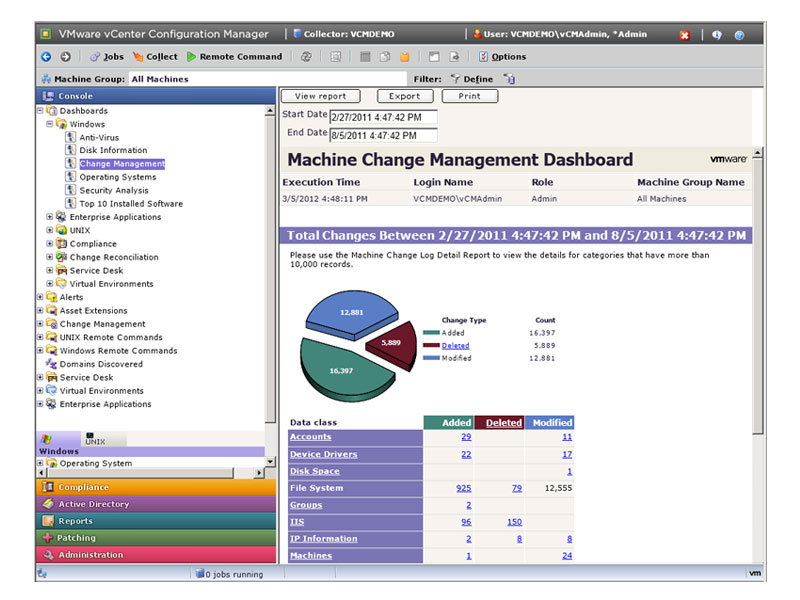 |
Automated Configuration and Compliance ManagementvCenter Configuration Manager automates critical configuration and compliance management tasks including configuration data collection, configuration change execution, configuration reporting, change auditing, compliance assessment, patch management, OS provisioning and software package distribution. vCenter Configuration Manager supports configuration management across virtual and physical servers, across VMware Infrastructure and across multiple operations systems including Windows, Linux and Windows. In many cases vCenter Configuration Manager supports automated enforcement and remediation of non compliant configurations. |
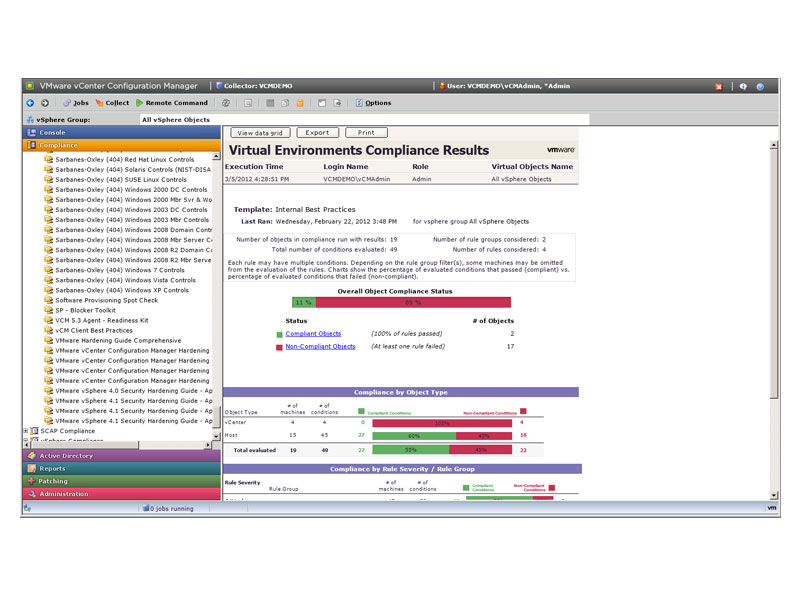 |
Continuous Compliance with Out-of-the-Box ToolkitsvCenter Configuration Manager includes built-in, out-of-the-box compliance toolkits developed by VMware’s Center for Policy and Compliance. Toolkits translate a broad range of standards and best practices into compliance templates that can be used to assess configuration compliance within your environment. Toolkits also include reports and dashboards to support unified compliance reporting. Out-of-the-box toolkits include (but are not limited to):
Organizations can also use vCenter Configuration Manager to build their own internal IT standards to drive best practices in their environments. These standards can be created by leveraging any of the toolkits above as a starting point or by creating a new company specific IT standards toolkit. |
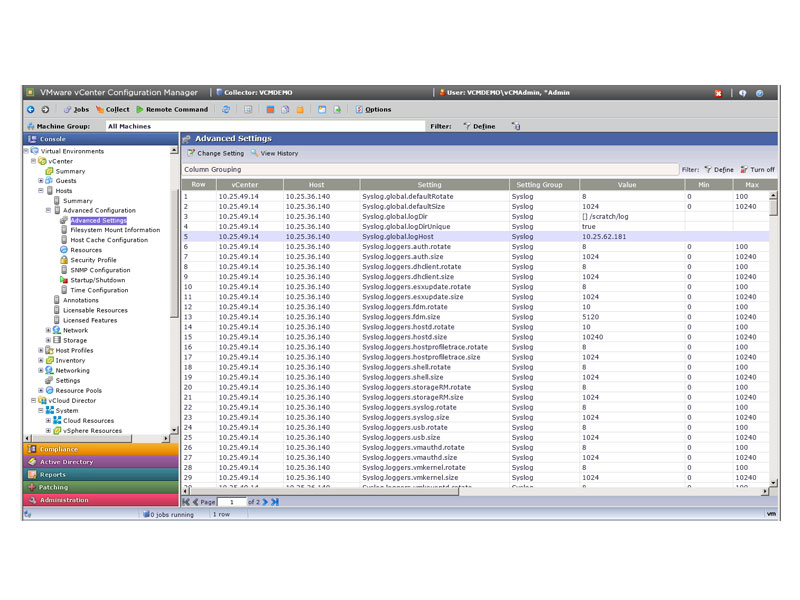 |
Fundamental to Clouds Built on VMware TechnologyVMware vCenter Configuration Manager is tightly integrated with vSphere and delivers fundamental capabilities that support hardening the VMware Infrastructure. This includes configuration compliance assessment (and in many cases automated remediation) for VMware ESX, ESXi, vCenter, vCloud Director and VMware vCloud Networking and Security. vCenter Configuration Manager also addresses configuration management for virtualization specific constructs such as compliance assessment and patching for VM templates and offline VMs. |
Key Features:
VMware vCenter Configuration Manager continuously assesses the configuration compliance of your virtual and physical environments including VMware Infrastructure and Windows, Linux and Unix operating systems, including your own internal standards, security best practices, vendor hardening guidelines and regulatory mandates such as HIPAA, PCI, and SOX.
Broad Configuration and Compliance Management Solution
- Centralized configuration change execution across VMware Infrastructure and Windows, Linux and Unix operating systems
- Extensive and continuous configuration data collection, configuration assessment and change auditing
- Unified reporting of configuration data and compliance-assessment results
- Automated remediation of “out-of-compliance” configurations
- Ability to assess OS patch status and deploy patches as needed
- OS provisioning to virtual and physical systems
- Automated support for software distribution (Windows only)
- SCAP 1.0 validated product
Out-of-the-Box Configuration Compliance Toolkits
- Out-of-the-box compliance toolkits for a broad range of standards—including security best practices, vendor hardening guidelines and regulatory mandates. Out-of-the-box toolkits include:
- Security best practices developed by the Defense Information Systems Agency (DISA), the National Institute of Standards and Technology (NIST), and the Center for Internet Security (CIS)
- Hardening guidelines from VMware and Microsoft
- Regulatory mandates such as Sarbanes-Oxley (SOX), Payment Card Industry (PCI), Health Insurance Portability and Accountability Act (HIPAA), and Federal information Security Act (FISMA)
- Use vCenter Configuration Manager to build your own internal IT standards to drive best practices in your environment
- Leverage one of the included toolkits as a starting point or create a new company specific IT standards toolkit
Fundamental to the Management of Clouds built on VMware Technology
- Deep configuration data collection, change tracking, and compliance assessment across the VMware infrastructure for VMware products including ESX, ESXi, vCenter, vCloud Director, and VMware vCloud Networking and Security
- Automated remediation of VMware Infrastructure across many use cases
- Correlation of performance issues identified by vCenter Operations Manager with change events tracked within vCenter Configuration Manager
- Manage configuration and compliance tasks across private, public and hybrid cloud use cases
- Configuration management for VM Templates and Offline VMs including configuration change execution, change tracking, compliance assessment, remediation of non compliant configurations, and OS patch management
- Snapshot VMs before executing configurations changes to support rollback operations if needed
- vCenter Configuration Manager API coupled with VMware vCenter Orchestrator supports integration with other VMware and 3rd party products
How to Buy:
Ordering vCenter Configuration Manager as part of vCenter Operations Management Suite
VMware vCenter Configuration Manager is a core component of both the vCenter Operations Management Suite Enterprise and Enterprise Plus Editions.
When purchased with VMware vCenter Operations Management Suite Enterprise Edition, vCenter Configuration Manager delivers configuration and compliance management for the VMware cloud infrastructure including VMware ESX, ESXi, vCenter, vCloud Director and VMware vCloud Networking and Security.
When purchased as part of the VMware vCenter Operations Management Suite Enterprise Plus Edition, vCenter Configuration Manager can also be used to provide configuration and compliance management for guests deployed onto vSphere or other 3rd party hypervisors.
Ordering vCenter Configuration Manager Standalone
vCenter Configuration Manager can also be purchased stand alone. When sold stand alone, vCenter Configuration Manager delivers the same capabilities that are included when sold as part of vCenter Operations Management Suite Enterprise Plus Edition.
Support:
VMware Basic Support & Subscription
Weekday Support for Test, Dev and Non-Critical Deployments
- Global, 12x5 access to support
- Unlimited number of support requests
- Remote Support
- Online access to documentation and technical resources, knowledge base, discussion forums
- Product updates and upgrades
Overview
VMware Basic Support is designed for non-critical applications and platforms that require support during normal business hours. Our global support centers have been strategically placed to provide you with fast and efficient access to the support center in your region. Each center is staffed with engineers that can provide industry-leading expertise in virtualization and years of experience supporting virtual infrastructure products in real-world customer environments. We are committed to delivering enterprise-class, worldwide support with a single objective in mind: your success.
VMware Production Support & Subscription Service
Technical Support, 12 Hours/Day, per published Business Hours, Mon. thru Fri.
- Global, 24x7 support for Severity 1 issues
- Fast response times for critical issues
- Unlimited number of support requests
- Remote Support
- Online access to documentation and technical resources, knowledge base, discussion forums
- Product updates and upgrades
Overview
VMware Production Support is designed with your production environments in mind. Our global support centers are staffed around the clock to provide you access to our industry-leading expertise in virtualization and years of experience supporting virtual infrastructure products in real-world customer environments. We are committed to delivering enterprise-class, worldwide support with a single objective in mind: your success.
| Feature | Production Support | Basic Support |
|---|---|---|
| Hours of Operation1 | 24 Hours/Day 7 Days/Week 365 Days/Year |
12 Hours/Day Monday–Friday |
| Length of Service | 1 or 3 Years | 1 or 3 Years |
| Product Updates 2 | Yes | Yes |
| Product Upgrades 2 | Yes | Yes |
| Products Supported 3 | All Products (excluding VMware Fusion and VMware Player) |
All Products |
| Method of Access | Telephone/Web | Telephone/Web |
| Response Method | Telephone/Email | Telephone/Email |
| Remote Support | Yes | Yes |
| Root Cause Analysis | Available only with Business Critical or Mission Critical Support Offering | Available only with Business Critical or Mission Critical Offering |
| Access to VMware Web Site | Yes | Yes |
| Access to VMware Discussion Forums and Knowledge Base | Yes | Yes |
| Max Number of Technical Contacts per Contract | 6 | 4 |
| Number of Support Requests | Unlimited | Unlimited |
| Target Response Times Critical (Severity 1) Major (Severity 2) Minor (Severity 3) Cosmetic (Severity 4) |
30 minutes or less: 24x7 4 business hours 8 business hours 12 business hours |
4 business hours 8 business hours 12 business hours 12 business hours |
| Business Hours North America Alaska, Hawaii Latin America Europe, Middle East, Africa (EMEA) Asia, Pacific Rim, Japan (APJ) Australia/New Zealand |
Monday - Friday 6 a.m. to 6 p.m. (local time zone) 6 a.m. to 6 p.m. (PST/PDT) 9 a.m. to 6 p.m. (local time zone) 7 a.m. to 7 p.m. (GMT/GMT+1) 8:30 a.m. to 8:30 p.m. (Singapore Time) 7 a.m. to 7 p.m. (Sydney AET) |
Monday - Friday 6 a.m. to 6 p.m. (local time zone) 6 a.m. to 6 p.m. (PST/PDT) 9 a.m. to 6 p.m. (local time zone) 7 a.m. to 7 p.m. (GMT/GMT+1) 8:30 a.m. to 8:30 p.m. (Singapore Time) 7 a.m. to 7 p.m. (Sydney AET) |
1 Hours of operation for Gemstone are Monday – Friday, 8 a.m. to 5 p.m. (PST/PDT). Severity 1 issues are responded to 24x7.
2 Product updates and upgrades are not included with Basic Support and Subscription Service for SUSE Linux Enterprise Server (SLES) for VMware.
Product updates and upgrades are not included with Production Support and Subscription Service for SUSE Linux Enterprise Server (SLES) for VMware.
3 VMware Fusion Professional and VMware Workstation require a minimum of ten (10) licenses in order to purchase Basic support. VMware Workstation requires a minimum of ten (10) licenses in order to purchase Production Support.
Documentation:
Download the VMware vCenter Configuration Manager Datasheet (PDF).