
Faronics Power Save
Reduce Operating Costs by Eliminating Unnecessary PC Energy Consumption

Sorry, this product is no longer available, please contact us for a replacement.
Overview:
Reduce Operating Costs by Eliminating Unnecessary PC Energy Consumption
PCs can be significant energy wasters, especially during periods of inactivity. As the price of energy continues to rise, organizations are finding their budgets and profits eroding due to higher operating costs. A dedicated PC power management solution is an inexpensive and impactful way to reduce an organization’s power bill and can deliver full return on investment.
Faronics Power Save keeps PCs running when users need them, powers them down when they are inactive, and can prove its rapid return on investment through energy savings reports.
Power Save Benefits
- Intelligent Power Savings
Intelligent, non-intrusive computer energy management that analyzes multiple indicators of system activity before going into power savings mode. - Non Disruptive
Accommodates IT maintenance schedules and allow users to temporarily over-right power actions when necessary. - Easy to Implement
Easy implementation through Audit Mode which provides baseline measurement and estimated savings. - Operational Savings and ROI
Provides tangible financial savings and rapid return on investment to organizations through reduced energy consumption. - In-Depth Visibility into Energy Savings
Detailed energy savings reports provide visibility into energy savings derived from the use of Power Save. - Manage with a Central Console
Management, deployment and configuration is made possible via a single web-based or on-premise console.
Key Features:
Advanced Activity Monitoring

Intelligently monitors CPU, network or disk activity and executes power-saving actions only when the activity falls below a defined level.
Configurable Energy Management

Power Policies allow for different levels of energy management at different times. Energy Consumption Profiles enable fine tuning of individual workstation power use.
Audit Mode

Disables Power Save actions while recording events on workstations for analysis of potential energy savings using Power Save reports.
End-user Overrides

End-users can temporarily disable power management for convenience and customize local wake-up from Hibernate or Standby mode.
Disruption Mitigation

Notifies users and saves open documents, spreadsheets, presentations, and email drafts, prior to going into Power Saving Mode.
Central Management

The web-based and on-premise management consoles make deployment, configuration and management a breeze.
Flexible Scheduling

Easily schedule wake-up, shutdown or restart events.
Management Reporting

Detailed energy use and savings reports based on local costs demonstrate rapid ROI.
Comprehensive Dashboards

The Power Save and Deep Freeze Cloud dashboards make it easy to visualize power consumption information for your entire organization.
Sample Power Plan Configuration
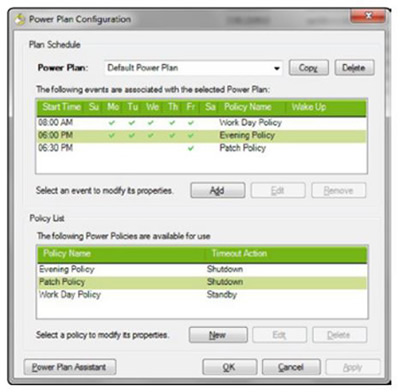
8:00am - PCs are turned on and a lax power saving policy is applied because users are working throughout the day.
6:00pm - A more aggressive policy is applied because users are heading home now. Also as part of this policy you can ask Faronics Power Save to save any open and unsaved documents for the user before powering down.
6:30pm - Faronics Power Save goes into Patch Mode so maintenance can be done on the machines.
Documentation:
Download the Faronics Power Save Datasheet (PDF).
Ready to Get Started? Learn more about Faronics at
